
Environments
Give agents managed sandboxes or your own machines to work in.
An environment is the computer an agent works on: its files and terminal tools act there. The Service offers two kinds:
- Managed environments, which the Service creates, starts, stops and deletes from a template, such as a Docker container per thread.
- External targets, computers you run yourself with the
a13n-envddaemon, which the Service only connects to.
Threads mount environments. Each run freezes the thread's mounts when it is accepted and uses them until it ends. Without a mounted environment, an agent has no file or terminal tools.
In Console, Environments → Templates manages templates and Environments → Instances lists environments, and providers are under Workspace settings → Providers → Environment. All API paths below are under /api/v1.
Workspace provisioning
The single-host Compose stack with a mounted Docker socket automatically adds a Docker provider and Linux Sandbox template to each workspace when the Engine is reachable. The template pins the independently versioned sandbox image reviewed by Service and uses pull_policy: if_missing. The Engine pulls the image when the first instance is created if it is not already present; workspace initialization does not pull it. The Linux image includes Python 3.13, pip, venv, uv, Node.js 24, npm, pnpm, Git, Bash, curl, ripgrep, jq, archive utilities and C/C++ build tools. Commands run as sandbox, with writable /workspace and /tmp/a13n. Project dependencies can be installed in a virtual environment or the project directory.
To use a locally built image for a new workspace, run make image-sandbox and start Compose with A13N_DOCKER_ENVIRONMENT_IMAGE=a13n-sandbox:local. Change an existing template in Console or through the API; provisioning does not replace it after initialization.
The socket-free quickstart does not enable Docker provisioning. For source development, make dev explicitly enables Local and creates a Local Workspace template rooted at that checkout's var/dev/environments. Each environment later gets its own subdirectory. Local runs commands directly as the operating-system user of the Service process and provides no isolation.
Local and Docker provisioning default off; enable them in Service settings. The all role sets up missing defaults at workspace creation and startup. If setup fails, fix Engine access and restart. Successful setup preserves later edits, disabling and deletions. It creates only providers and templates: reserve an environment, or set an agent's default_environment_template_id.
Providers
An environment provider is the account environments run on. Create it like any other provider, in /api/v1/environment-providers. GET /api/v1/provider-types/environment returns each type's configuration, credential and recipe schemas.
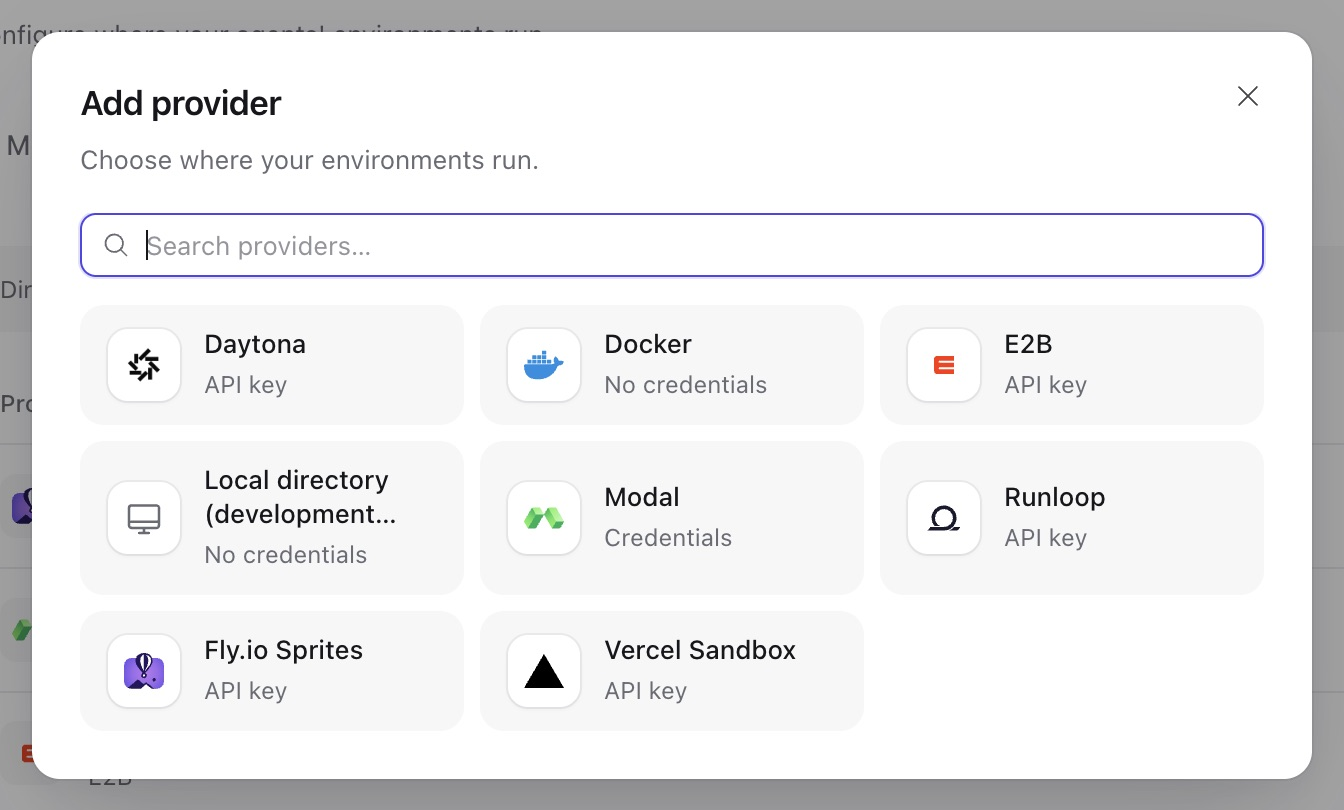
Provider selection in a seeded workspace. Local directory appears only when provisioning.local.enabled is set, which is meant for development.
| Type | Environments | Account | Stop |
|---|---|---|---|
docker | Containers | docker_host, optionally a remote tcp://host:port or https://host:port engine the outbound endpoint policy allows. No credential. | Stops the container |
e2b | E2B sandboxes | domain selects E2B cloud (default e2b.dev) or another E2B-compatible service; credential {"api_key": ...}. A recipe's timeout_seconds is at least 300. | Pauses, keeping memory and files |
daytona | Daytona sandboxes | organization_id, optional target region; credential {"api_key": ...} | Stops, keeping files |
modal | Modal sandboxes | workspace, app_name (a deployed App that holds the sandboxes), optional environment_name; credential {"token_id", "token_secret"} | Snapshots the files, then terminates |
vercel | Persistent Vercel sandboxes | team_id, project_id; credential {"api_key": ...} (a Vercel access token) | Stops, keeping files |
sprites | Fly.io Sprites | organization; credential {"api_key": ...} | Not supported; Sprites sleep when idle |
runloop | Runloop devboxes | organization; credential {"api_key": ...} | Suspends, keeping files |
local | Directories on the worker host, for development | Offered only with provisioning.local.enabled. Commands run directly on the worker host, which is no isolation boundary. | Nothing to stop |
A Docker provider uses the operator's environments.docker_host by default; a provider-specific docker_host must be a remote TCP or HTTPS engine allowed by the outbound policy. Docker Engine access grants host-level authority. Templates may bind host directories only under environments.docker_mount_roots (none by default); privileged containers and host namespaces are not available. Bound CPU, memory and process use on the Engine. The Compose deployment connects the host Engine; the Kubernetes chart does not include one.
Hosted types reach vendor-owned APIs. E2B selects its cloud or another E2B-compatible service; other hosted accounts name an organization, team, workspace or app, never a host. Their sandboxes are billed to that account. The Service keeps a ready E2B, Modal, Vercel or Runloop sandbox alive by renewing it before the vendor would end it, so set the template's idle policy to bound what these sandboxes cost. A provider's credential can change to an account that cannot see a sandbox. The environment then shows the failure provider_credential_changed. It becomes usable again when a credential of the sandbox's account is restored. Renewal cannot pass a vendor's hard limit: Modal ends a sandbox at its recipe's timeout_seconds (at most 24 hours), after which the environment shows as lost, and Vercel ends a sandbox session at its recipe's timeout_seconds, after which the environment is stopped and the next run resumes it. A template's idle stop that comes first keeps the files. See provider configuration for every recipe field.
To use another E2B-compatible service, create an e2b provider with its sandbox domain and API key:
{
  "type": "e2b",
  "name": "Compatible E2B",
  "config": {"domain": "sandboxes.example.com"},
  "credential": {"api_key": "YOUR_SANDBOX_API_KEY"}
}
The Service derives the HTTPS control API https://api.<domain> from the configured sandbox domain. Use a lowercase DNS name without a scheme, port or path; independent api_url overrides are not supported. The native SDK owns control and sandbox requests, including endpoints returned by the selected service. Service does not inspect each SDK request; operator infrastructure owns network routing restrictions. Changing the domain requires replacing or removing its credential and creating new environment instances. Use a template from that service and verify compatibility with the repository's locked E2B SDK 2.46.4: creation, connection, renewal, command/file operations, pause/resume and destruction.
Only a Docker provider can be tested (POST …/{provider_id}/test): the engine answers one ping. A remote engine that does not resolve fails with message provider_unavailable; only a policy refusal answers provider_endpoint_denied.
Templates
A template describes how to build a managed environment and when to stop and delete idle ones. Templates belong to a workspace; creating and changing them needs write. This example uses a Docker provider; replace eprov_... with its ID.
curl -X POST "$A13N_URL/api/v1/environment-templates" \
  -H "Authorization: Bearer $A13N_API_KEY" -H "Content-Type: application/json" \
  -d '{"name": "Python sandbox", "provider_id": "eprov_...",
       "config": {"recipe": {"cpus": 2, "memory_gb": 4},
"stop_after_seconds": 1800, "delete_after_seconds": 604800}}'provider_idnames an environment provider of the workspace, andconfig.recipeis validated by its type's recipe schema. For Docker it sets theimage, host directorymounts(their sources must lie belowenvironments.docker_mount_roots),environmentvariables, aninit_script,disable_network, theuser, and resource limits; seeDockerEnvironmentConfiguration. A rejected recipe identifies the invalid fields without returning their submitted values.stop_after_seconds(default 1800, 60–2,592,000) stops an environment no run has used for that long.delete_after_seconds(60–31,536,000) deletes one that no run has used for that long and no thread mounts.nullturns either off. Both count from the environment's last use.PATCHchanges the name, description, provider, config and labels with the template'sIf-Match. A new provider or recipe applies to environments created afterwards: an environment is built from the template as it is when its creation is dispatched, and keeps that recipe. The idle policy always applies as currently set.PATCH {"enabled": false}stops new environments from the template;{"enabled": true}allows them again. Existing environments keep working.
To give every root thread of an agent its own environment, set the agent's default_environment_template_id. When a run of a thread without a workspace mount is accepted, the Service reserves a new environment from that template and mounts it as workspace. Its status is reserved: acceptance creates neither a vendor resource nor a queued create operation. With the default lazy preparation policy, a text-only run that never uses the environment can finish directly. Reservations count toward the managed-environment quota; Control does not proactively create them.
Docker image versions
Leave recipe.image unset to use the Service-reviewed ghcr.io/converge-ai-labs/a13n-sandbox release. Sandbox versions belong to Envd, not to Service:
| Service build | Image tag |
|---|---|
| Stable or RC | 0.1.3 |
Source (0.0.0, including local suffixes) or .devN | dev |
Release images support linux/amd64 and linux/arm64. Set recipe.image explicitly to keep a particular tag across Service upgrades, or use a digest to pin exact content. A Docker recipe defaults to pull_policy: if_missing: the Engine uses local images and pulls missing ones. Set never to require a local image. The automatically provisioned template stores the reviewed sandbox image explicitly, so later Service upgrades do not silently change it.
Each instance saves its resolved image before its first create; upgrades and interrupted creates keep that image. Legacy instances without a saved image keep the historical a13n-docker-environment:dev; recreate them to migrate before removing that old image. Create a new environment to use a changed image or template.
Instances
GET …/environments lists the workspace's environments, filtered by status; deleted ones appear only with status=deleted. Each has a status:
| Status | Meaning |
|---|---|
reserved | Reserved until first use; no vendor resource exists yet. |
creating, starting | Being created or started. |
ready | Usable. |
stopping, stopped | Stopped environments keep their files; a run that mounts one starts it again. |
deleting, deleted | Being deleted, or gone. Deleted environments cannot be used again. |
failure describes the last failed operation with code, message, certainty (not_dispatched, known, or unknown when the call may have taken effect) and permanent. Maintenance retries unfinished operations with the same operation ID. A permanent failure refuses new mounts and runs until its cause is fixed or the environment is deleted.
Reserve a managed environment
Environments are usually reserved automatically for agents with a template. To create one yourself, for example to share it between threads:
curl -X POST "$A13N_URL/api/v1/environments" \
  -H "Authorization: Bearer $A13N_API_KEY" -H "Content-Type: application/json" \
  -d '{"template_id": "envtpl_...", "name": "Shared data"}'
It needs run, starts in creating, and becomes ready in the background. The template's idle policy applies to it like any other. A workspace holds at most environments.managed_count managed environments that are not deleted; a reservation beyond it, explicit or at run acceptance, is 409 conflict with reason environment_limit.
Register an external target
Run the a13n-envd daemon over HTTP(S) on the target computer, with a device ID and token (see Connect to an existing HTTP daemon). Then register it with its endpoint and token:
curl -X POST "$A13N_URL/api/v1/environments" \
  -H "Authorization: Bearer $A13N_API_KEY" -H "Content-Type: application/json" \
  -d '{"endpoint": "https://build-box.example.com:8443", "token": "...", "name": "Build box"}'
Registration needs write. The endpoint is the daemon's HTTP(S) origin; plain HTTP is accepted only for a loopback address, and the outbound endpoint policy must allow it. The Service asks the daemon which device it is and opens an Envd Session on it, then records a ready environment named after the device unless you give a name. The token is stored encrypted and never returned; the environment shows its endpoint and device_id. An endpoint the policy refuses answers 409 conflict with the reason on endpoint. A daemon that refuses the token looks the same as one that cannot be reached: both answer 503 unavailable with reason provider_connection_failed.
Every later connection expects the same device, so a different daemon answering at that endpoint is refused with provider_device_mismatch, and runs that mount the environment fail. When the daemon moves or its token changes, send the token again, with the new endpoint if it moved:
curl -X PATCH "$A13N_URL/api/v1/environments/$ENVIRONMENT" \
  -H "Authorization: Bearer $A13N_API_KEY" -H "Content-Type: application/json" -H "If-Match: $ENVIRONMENT_ETAG" \
  -d '{"endpoint": "https://build-box-2.example.com:8443", "token": "..."}'
The Service verifies the new connection first; a daemon with another device ID answers 409 conflict with reason provider_device_mismatch. An external target is private: only the principal (user or service account) that registered it can mount it, and only that principal or a workspace administrator can change or delete it. The Service never stops or deletes the daemon's computer; deleting the environment forgets its token.
Stop, rename and delete
These take the environment's If-Match and need write:
PATCH …/environments/{environment_id}with{"name": ...}renames it; an external target also takes a newtokenandendpoint(above).POST …/stopstops areadymanaged environment that no run is using, and answers202; a later run starts it again. Otherwise it answers409 conflictwith a reason such asin_use,environment_stopped,connect_only(an external target),stop_unsupported, or the code of a permanent failure, such asenvironment_lost, that stopping would clear.DELETE …/environments/{environment_id}retires an environment no active run uses. Unmount it from threads first; otherwise the request returns409 conflictwith reasonmounted. Exception: deleting a permanently failed environment also removes its thread mounts, so a thread with a default template can get a newworkspaceenvironment on its next run. An unresolved operation returns409 conflictwith reasonoperation_unresolved. Deleting a managed environment destroys its files; deleting an external target only forgets its token, not the computer.
A permanent failure, such as environment_lost, prevents new use; delete the environment or fix the cause where possible. A transient failure clears after a successful retry.
Mount environments on a thread
A thread's mounts decide what its later runs use:
curl -X POST "$A13N_URL/api/v1/threads/$THREAD/environments" \
  -H "Authorization: Bearer $A13N_API_KEY" -H "Content-Type: application/json" -H "If-Match: $THREAD_ETAG" \
-d '{"name": "data", "environment_id": "env_...", "working_directory": "/srv/data"}'namematches^[a-z][a-z0-9-]{0,62}$. The mount namedworkspaceis the primary one and appears to the agent at/workspace; others appear at/mnt/{name}.working_directoryis the mount's starting directory inside the environment.- A thread mounts each name and each environment once. To replace a mount, remove it and add it again.
- A thread holds at most 32 mounts; a request beyond that is
409 conflictwith reasonmount_limit. Acceptance may still add theworkspacemount from the agent's default template beyond this limit. - Mount changes take the thread's
If-Match, return the thread's new ETag, needrun, and affect runs accepted afterwards; a run accepted earlier keeps its mounts.GET …/threads/{thread_id}/environmentslists the mounts with the thread's ETag, andDELETE …/threads/{thread_id}/environments/{name}removes one. - New threads and forks take initial mounts in their
environmentsfield. A fork shares its origin thread's mounts unless it setsfresh_environments. Archiving a thread removes its mounts. - Several threads may mount the same environment and use it at once.
By default, AgentConfig.lazy_environment is true. On first use of each mount, the worker waits up to environments.wait_seconds for that environment to be ready, creating reserved targets or starting stopped ones. If another dispatcher holds the operation claim, the worker waits for its published result; claim contention alone is not readiness. Input attachments and environment-backed skills can trigger first use before a model call. If they do not become ready in time, the attempt fails and the run is retried within its attempt budget; an environment that can no longer be used, such as a deleted one, fails the run with environment_unavailable.
Set lazy_environment: false in the agent configuration to have Service create or start every mounted instance and wait for it to be ready before entering Harness, even if no tool uses it. This only prepares instances. Harness still opens each execution connection on first dependent use, when operation readiness and any selected working directory are checked. A run that never uses an environment opens no execution connection to it. A run without mounts has nothing to prepare. Explicit environment creation through POST …/environments keeps its existing behavior.
Override the agent's choice for one run through message options:
{"options": {"overrides": {"lazy_environment": false}}}An omitted or null override inherits the agent revision's value. The accepted choice survives retries and continuation runs. Async children use their own agent's configuration; inline children share their parent's environment.
Async subagents get environments from their edge's policy: the parent run's mounts (shared), a new environment from a template (dedicated), or none.
Reuse an instance with a project directory
In a new conversation's Options, select Reuse existing and optionally enter a Working directory. The Add environment form on an existing conversation offers the same field. Leave it empty to keep the provider default. Switching instances clears the previous choice; the conversation's environment details show its saved directory.
The directory must already exist inside the selected environment. For Local, /projects/app maps to {template root}/{environment ID}/projects/app, not a path on the browser's computer. For other providers, use their environment-local file namespace. The Service checks explicit directories on first activation and reports missing or inaccessible paths without creating them or marking the shared instance broken.
Two conversations can use different project directories on one instance, or deliberately use the same directory to share files. Relative file paths, the /workspace route and the default command cwd use the chosen directory. Processes, ports, installed software and native permissions remain shared: this is file organization, not security isolation. Removing a mount does not delete the directory; accepted runs keep their captured selection.